Order
Downline
Signups - Secure Checkout

Credit
Card: If
you want to make a purchase using: Credit
Card
to
complete your order follow the steps below.
We use a third party processor to handle
our credit card orders.
Click
on the buy now button. A new window
will open to: https://www.coinmama.com
Follow
the instructions below to pay for your
Membership using your credit card or bank
transfer.

| Step
1: |
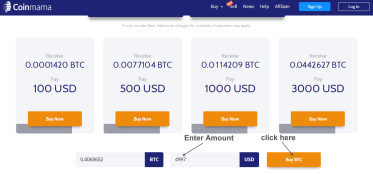
Click
Buy Now. Example:
Enter $297 then click Buy BTC
Instruction
Video:
This
is how to use Coinmama click
here
Detailed
Instructions: Click
here
|
| Step
2: |
Then
signup or log into your coinmama account |
| Step
3: |
Next
verify your account which takes just
minutes |
| Step
4: |
Click
the "Buy/Sell" tab. Then
enter the Amount of $297
USD. Then click buy bitcoin to complete
the purchase. (now the bitcoin is
in your account) |
| Step
5: |
Next
it will say "Enter your bitcion
wallet address" enter this
code:
bc1qxj9xrdmqjy548hrh2ezd7thd6j44jyr38898rg
For
Amount Enter the price listed for
the membership you want (ie: Standard
is $297
USD. Rates are listed on the side).
Then click "Continue".
Confirm payment and click "Send".
(this transfers your payment to
us).
|
| Step
6: |
After
you've completed your credit card
order, please then click
here to send us confirmation
of your payment.
If
you require assistance please contact
us. Thank you.
|







 ALL ORDERS ARE
100% SECURE!
ALL ORDERS ARE
100% SECURE!
 “Thanks
for your help. Yes I got 500 new
downline signups in just weeks
after joining. I now have a large
growing down-line. I'll be sure to
order more very shortly. At last I've
found an easy way to build my down-line.
Pro Downline is a dream come true
for anyone doing a network marketing
business!"
“Thanks
for your help. Yes I got 500 new
downline signups in just weeks
after joining. I now have a large
growing down-line. I'll be sure to
order more very shortly. At last I've
found an easy way to build my down-line.
Pro Downline is a dream come true
for anyone doing a network marketing
business!"