|
CASH
ORDER OPTION
SUMMARY:
If you want to pay with plain old cash, it's easy.
Just follow the steps below.
You'll
go to your local bitcoin ATM and simply
make a deposit and you're done. Follow these simple
steps by pay with cash.
Using Paper Cash Money at Your
Local Bitcoin ATM:
STEP
1: Getting Cash: Go to your regular bank ATM.
Insert your credit card, and do a cash advance
to withdraw cash. Or insert your bank card and
withdraw cash from your checking or savings account.
Take out the amount of cash you'll require for
your Membership purchase (ie: Standard Membership
$297 round up to 300).
STEP
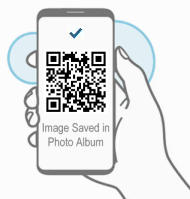
2: Next, using your smart phone take a screen
shot, or photo of this QR code image
you see below:
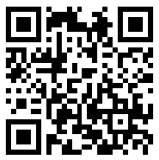
bc1qxj9xrdmqjy548hrh2ezd7thd6j44jyr38898rg
STEP
3: Open google search (https://www.google.com)
(or google maps).
Type
in and search google for this keyword: bitcoin
ATM ... or .... bitcoin ATM + (name
of your town, city) ie: bitcoin atm Miami
FL.
Typically
this should bring up the location of your local
bitcoin ATM machine. Bitcoin ATM's are basically
similiar to regular bank ATM's only that they
allow you to order bitcoins by depositing cash.
Usually they're located in places like neighborhood
shopping malls and coffee shops.
Check
to ensure the Bitcoin ATM is both: working and
that you're going there during their open business
hours. (call ahead if it's at say a coffee shop
to verify)
STEP
4: Go to the Bitcoin ATM. Bring
with you: 1) smartphone with
image of bitcoin QR code above. 2)
cash money
|
Confirmed
Location
|
Smart
Phone With Photo
|
Cash
|
- The
Bitcoin ATM is working.
- I
have the address.
- The
Coffee shop where it's located is
open until 9pm. I'm good to go!"
|
|
|
STEP
5: Follow the steps shown on the ATM screen.
Each bitcoin ATM is different. Most are easy to
use and very user friendly. Just be sure to bring
your smart phone with you to the ATM.
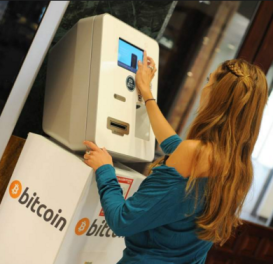
- The
ATM will ask if you're "Buying" or
"Selling" bitcoin. Select "Buying".
- Then
the ATM will ask you to scan the QR code. Open
the QR code. Then simply hold your phone up
to the ATM scanner.
- After
the ATM reads the QR code, it will ask you to
input your cash. Input:
-
| Choose
Your Membership (Save 50% when
you order today) |
| Standard
|
25
signups |
$297
USD |
| Advanced
|
45
signups |
$397
USD |
| Professional
|
100
signups |
$497
USD |
| Platinum
|
150
signups |
$697
USD |
| VIP |
200
signups |
$897
USD |
| Elite |
500
signups |
$1497
USD |
- Billed
in one lump sum payment.
-
Simple way to pay with cash, if you don't
have a credit card.
- After
you feed your cash into the ATM machine it will
provide you with a confirmation receipt. Keep
that.
- Sometimes
it's a paper receipt, sometimes it's just a
confirmation on the screen. If it's just on
the screen please take a photo of it. (Don't
lose your confirmation).
- Rest
assured, because the ATM is scanning the QR
code (step 1), it's virtually impossible for
there to be any errors which is why these bitcoin
ATM's are so popular for sending funds to people
in this new format around the world.
STEP
6: Once you've completed using the ATM, and
made payment, then click "Confirm Payment"
below to complete the transaction. We will then
confirm your payment has arrived. After we've
confirmed your payment you will get a "welcome
email" with your login info. Thank you.
.
|
 “Thanks
for your help. Yes I got 500 new downline
signups in just weeks after joining.
I now have a large growing down-line. I'll
be sure to order more very shortly. At last
I've found an easy way to build my down-line.
Pro Downline is a dream come true for anyone
doing a network marketing business!" “Thanks
for your help. Yes I got 500 new downline
signups in just weeks after joining.
I now have a large growing down-line. I'll
be sure to order more very shortly. At last
I've found an easy way to build my down-line.
Pro Downline is a dream come true for anyone
doing a network marketing business!"
|
BACKED BY A FULL
100% MONEY BACK GUARANTEE* |
|
*Other
payment options:
If you're
having any problems and need an alternative payment
method then click
here
|