SUMMARY: Below are some
other purchase options for your
added purchase convenience.
Select the one you'd like to
use and follow the directions
outlined below. As of
we accept any of these types
of payment.
Payment
Options Menu: Select your
payment. (or scroll down
to view your options)
We
accept most every payment method:
There's several different
payment options shown below.
Scroll down and select the best
option for you below. We offer
these different options to better
accomodate a global audiance
needing to pay using different
payment methods.
Trouble-shooting:
In case you're trying to
place an order, but experiencing
any errors or difficulties,
in most cases your best option
is to simply try one of the
other payment options available.
Also you can do the following:
1)
Review our help
section here. Or 2) contact
us and let us know what's
happening, we will be able to
assist you further.
Note:
If any one of these payment
option for some reason does
not work, then please select
one of the other options avaliable
from the menu. Thank you.
If
you need any help please contact
us and a client support specialist
will be ready to assist you.
Thank you.
BACKED BY A FULL
100% MONEY BACK
GUARANTEE*
Credit
Card Option #1:
(Main
Credit Card Order Option) [top]
Click
here: Pay
Using Credit Card. Then
on the next page click on the
"Buy" button
and follow the instructions
provided.
Supported countries:
Worldwide
This
option allows for online bitcoin
purchases using your credit
card. Some verification required.
If for some reason it doesn't
work, or you encounter any issues,
then try using one of several
alternatives from this page,
or feel free to contact us for
assistance.
Once
you've completed making payment,
then click "Confirm Payment"
below.
Decide
on the Membership you want.
The prices are listed below.
Choose
Your Membership (Save
50% when you order today)
(view
all plans)
Click
here: Pay
Using Credit Card. Then
on the next page click on the
"Buy" button
and follow the instructions
provided.
Supported countries:
Worldwide
This
option allows for online bitcoin
purchases using your credit
card. Some verification required.
If for some reason it doesn't
work, or you encounter any issues,
then try using one of several
alternatives from this page,
or feel free to contact us for
assistance.
Once
you've completed making payment,
then click "Confirm Payment"
below.
Decide
on the Membership you want.
The prices are listed below.
Choose
Your Membership (Save
50% when you order today)
Standard
Membership:
(25
signups)
$594
now
just
$297 USD
Advanced
Membership:
(45
signups)
$794
now
just
$397 USD
Professional
Membership:
(100
signups)
$994
now
just $497 USD
Platinum
Membership:
(150
signups)
$1394
now
just $697 USD
VIP
Membership:
(200
signups)
$1794
now
just $897 USD
Elite
Membership:
(500
signups)
$2994
now
just $1497 USD
Credit
Card Option #3:
(Backup
Credit Card Order Option)[top]
Use
Bitcoin Address (copy and
paste this address shown in
blue):
bc1qxj9xrdmqjy548hrh2ezd7thd6j44jyr38898rg
Click
the copy text
button to copy
our BTC code.
Or just highlight
and copy the code
shown in blue
below.
Then paste it
into the appropriate
section where
it asks for the
BTC address you
want to send funds
to (ctrl+v, or
just right click
and paste)
bc1qxj9xrdmqjy548hrh2ezd7thd6j44jyr38898rg
(NOTE:
If you'd prefer to transfer
to your own bitcoin wallet first,
that's perfectly fine. You'll
need to first set up your own
bitcoin wallet.)
This
option allows for online bitcoin
purchases using your credit
card. Some verification required.
If for some reason it doesn't
work, or you encounter any issues,
then try using one of several
alternatives from this page.
Once
you've completed making payment,
then click "Confirm Payment"
below.
Decide
on the Membership you want.
The prices are listed below.
Choose
Your Membership (Save
50% when you order today)
Click here: SendWyre
Option Then
click on the "Buy"
button and follow the instructions
provided.
Supported countries:
Worldwide
Use
Bitcoin Address (copy and
paste this address shown in
blue):
bc1qxj9xrdmqjy548hrh2ezd7thd6j44jyr38898rg
Click
the copy text
button to copy
our BTC code.
Or just highlight
and copy the code
shown in blue
below.
Then paste it
into the appropriate
section where
it asks for the
BTC address you
want to send funds
to (ctrl+v, or
just right click
and paste)
bc1qxj9xrdmqjy548hrh2ezd7thd6j44jyr38898rg
(NOTE:
If you'd prefer to transfer
to your own bitcoin wallet first,
that's perfectly fine. You'll
need to first set up your own
bitcoin wallet.)
This
option allows for online bitcoin
purchases using your credit
card. Some verification required.
If for some reason it doesn't
work, or you encounter any issues,
then try using one of several
alternatives from this page.
Once
you've completed making payment,
then click "Confirm Payment"
below.
Decide
on the Membership you want.
The prices are listed below.
Choose
Your Membership (Save
50% when you order today)
You'll
complete your payment using
Credit Card. We use a
partner site "Coinmama".
They take major all major credit
cards on their ultra high security,
globally recognized sites. Choose
which one you're more familiar
with or more comfortable using.
Step
1: On
your Smartphone go to the App
Store. Search for: Crypto.com.
Then download the "Crypto.com
App". Then open the
app.
Step
2: Using
the Crypto.com App, now click
on the "Buy" button.
And choose: Bitcoin (BTC). Purchase
bitcoin in the amount of the
membership you want below; by
using your credit card or debit
card.
Step
3: After
you've purchased
your bitcoin with your credit
card. Then click "Transfer"
and then click "Withdraw
BTC"
Step
4: Send
Bitcoin Coin this Bitcoin Address
(copy and paste this address
shown in blue):
bc1qxj9xrdmqjy548hrh2ezd7thd6j44jyr38898rg
Click
the copy text
button to copy
our BTC code.
Or just highlight
and copy the code
shown in blue
below.
Then paste it
into the appropriate
section where
it asks for the
BTC address you
want to send funds
to (ctrl+v, or
just right click
and paste)
bc1qxj9xrdmqjy548hrh2ezd7thd6j44jyr38898rg
Step
5: After
you've completed your credit
card order, and you've successfully
transfered that bitcoin to our
address, then please click
here to send us confirmation
of your payment.
Choose
Your Membership (Save
50% when you order today)
Standard
Membership:
(25
signups)
$594
now
just
$297 USD
Advanced
Membership:
(45
signups)
$794
now
just
$397 USD
Professional
Membership:
(100
signups)
$994
now
just $497 USD
Platinum
Membership:
(150
signups)
$1394
now
just $697 USD
VIP
Membership:
(200
signups)
$1794
now
just $897 USD
Elite
Membership:
(500
signups)
$2994
now
just $1497 USD
Supported
countries: Available in
most countries
(NOTE:
If you'd prefer to transfer
to your own bitcoin wallet first,
that's perfectly fine. You'll
need to first set up your own
bitcoin wallet.)
This
option allowss for online bitcoin
purchases using your credit
card. Some verification might
be required.
Once
you've completed making payment,
then click "Confirm Payment"
below.
Credit
Card Option #7:(select
countries supported)[top]
Click here: https://www.luno.com (a
new window will open. Open a
new account on Paybis.com if
you don't have one)
Availability
in these countries:
AUSTRALIA,EUROPE,INDONESIA,MALAYSIA,SINGAPORE,AFRICA,UNITED
KINGDOM
Step
1: Get
the Luno App for your smartphone:
Luno.com
Step
2: Open
the Luno wallet app. Click on
"Wallet", then on
the "currency" of
your country, then "Deposit",
then on "bank transfer"
(or credit card).
Step
3: Enter
the amount you want to transfer.
It should be equal to the amount
of the membership plan you want.
(Membership plans listed below)
Step
4: Upload
the funds to your Luno wallet.
Then click on Buy Bitcoin. Buy
in the amount of your plan.
Then after you get the bitcoin
in your wallet, you'll tranfer
it to our wallet listed below.
Step
5: Send
Bitcoin Coin this Bitcoin Address
(copy and paste this address
shown in blue):
bc1qxj9xrdmqjy548hrh2ezd7thd6j44jyr38898rg
Click
the copy text
button to copy
our BTC code.
Or just highlight
and copy the code
shown in blue
below.
Then paste it
into the appropriate
section where
it asks for the
BTC address you
want to send funds
to (ctrl+v, or
just right click
and paste)
bc1qxj9xrdmqjy548hrh2ezd7thd6j44jyr38898rg
Step
6: After
you've completed your credit
card order, then please click
here to send us confirmation
of your payment.
Step
7: You
will receive a welcome email
from us with your login information
and instructions to get started
using our system.
Credit
Card Option #8:(most
countries supported)[top]
Click here: www.paybis.com (a
new window will open. Open a
new account on Paybis.com if
you don't have one)
Step
2: Where
it says: You spend: Enter the
value in USD of the Membership
you're ordering. (membership
prices are shown below)
Step
3: Click
on: Buy Bitcoin
Step
4: You'll
be asked to create an account
if you don't have one.
Step
5: Send
Bitcoin Coin this Bitcoin Address
(copy and paste this address
shown in blue):
bc1qxj9xrdmqjy548hrh2ezd7thd6j44jyr38898rg
Click
the copy text
button to copy
our BTC code.
Or just highlight
and copy the code
shown in blue
below.
Then paste it
into the appropriate
section where
it asks for the
BTC address you
want to send funds
to (ctrl+v, or
just right click
and paste)
bc1qxj9xrdmqjy548hrh2ezd7thd6j44jyr38898rg
Step
6: After
you've completed your credit
card order, then please click
here to send us confirmation
of your payment.
Step
7: You
will receive a welcome email
from us with your login information
and instructions to get started
using our system.
Click
here:
www.coinbase.com A
new window will open. Open a
new account if you don't have
one.
Notice:
Coinbase is one of the top rated
bitcoin exchanges online. But
we don't recommend them as
a first option. Mainly because
typically there can be some
delays using their service.
Typically they hold your
funds for about 1-2 weeks.
You can still use it and it's
definitely one of the more user
friendly websites, but it's
not an instant payment option.
The main thing is it works.
They
take both: 1) credit card
payments or 2) bank transfers.
So you can use either one.
Instruction
Video:
This
is how to use Coinbase click
here
Step
1:
Click
Buy Now. Set
up an account on Coinbase.
Step
2:
The
login and click on the
"Buy/Sell" tab
at the top
Step
3:
Next
add your payment method.
ie: Credit Card, or other.
Step
4:
Click
the "Buy/Sell"
tab. Then enter the Amount
of the package your ordering
in USD. Then click buy
bitcoin to complete the
purchase. (now the bitcoin
is in your account)
Step
5:
Next
click on Accounts. Under
"BTC Wallet"
click send. Under "Recipient"
enter this code:
bc1qxj9xrdmqjy548hrh2ezd7thd6j44jyr38898rg
For
"Amount" enter
the amount of the package
your buying or click
on: "Send max".
Then click "Continue".
Confirm payment and
click "Send".
(This transfers your
payment to us to complete
your order).
Step
6:
After
you've completed your
credit card order, please
then click
here to send us
confirmation of your payment.
Choose
Your Membership (Save
50% when you order today)
Standard
Membership:
(25
signups)
$594
now
just
$297 USD
Advanced
Membership:
(45
signups)
$794
now
just
$397 USD
Professional
Membership:
(100
signups)
$994
now
just $497 USD
Platinum
Membership:
(150
signups)
$1394
now
just $697 USD
VIP
Membership:
(200
signups)
$1794
now
just $897 USD
Elite
Membership:
(500
signups)
$2994
now
just $1497 USD
Supported
countries: Most countries
Credit
Card Option #10:(select
countries only)[top]
Click here: www.switchere.com (a
new window will open. Open a
new account on Switchere if
you don't have one)
Step
2: Purchase
bitcoin in the amount of the
membership you want below.
Step
3: Send
Bitcoin Coin this Address (copy
and paste this address shown
in blue):
bc1qxj9xrdmqjy548hrh2ezd7thd6j44jyr38898rg
Click
the copy text
button to copy
our BTC code.
Or just highlight
and copy the code
shown in blue
below.
Then paste it
into the appropriate
section where
it asks for the
BTC address you
want to send funds
to (ctrl+v, or
just right click
and paste)
bc1qxj9xrdmqjy548hrh2ezd7thd6j44jyr38898rg
Step
4: After
you've completed your credit
card order, please then click
here to send us confirmation
of your payment.
Choose
Your Membership (Save
50% when you order today)
Standard
Membership:
(25
signups)
$594
now
just
$297 USD
Advanced
Membership:
(45
signups)
$794
now
just
$397 USD
Professional
Membership:
(100
signups)
$994
now
just $497 USD
Platinum
Membership:
(150
signups)
$1394
now
just $697 USD
VIP
Membership:
(200
signups)
$1794
now
just $897 USD
Elite
Membership:
(500
signups)
$2994
now
just $1497 USD
Supported
countries: Available in
all countries (except the US)
(NOTE:
If you'd prefer to transfer
to your own bitcoin wallet first,
that's perfectly fine. You'll
need to first set up your own
bitcoin wallet.)
This
option allowss for online bitcoin
purchases using your credit
card. Some verification might
be required.
Once
you've completed making payment,
then click "Confirm Payment"
below.
Step
1: Click
"Register" in the
top right. Here's the instructions
to buy your bitcoin: click
here
Step
2: After
you buy your bitcoin then transfer
it to us using the instructions
shown here: click
here You'll
send it to the bitcoin address
you see in blue below. Copy
and paste that bitcoin address
you see below into Bianance
(do not type it).
Step
3: Send
Bitcoin Coin this Address (copy
and paste this address shown
in blue):
bc1qxj9xrdmqjy548hrh2ezd7thd6j44jyr38898rg
Click
the copy text
button to copy
our BTC code.
Or just highlight
and copy the code
shown in blue
below.
Then paste it
into the appropriate
section where
it asks for the
BTC address you
want to send funds
to (ctrl+v, or
just right click
and paste)
bc1qxj9xrdmqjy548hrh2ezd7thd6j44jyr38898rg
Step
4: After
you've completed your credit
card order, please then click
here to send us confirmation
of your payment.
Choose
Your Membership (Save
50% when you order today)
Standard
Membership:
(25
signups)
$594
now
just
$297 USD
Advanced
Membership:
(45
signups)
$794
now
just
$397 USD
Professional
Membership:
(100
signups)
$994
now
just $497 USD
Platinum
Membership:
(150
signups)
$1394
now
just $697 USD
VIP
Membership:
(200
signups)
$1794
now
just $897 USD
Elite
Membership:
(500
signups)
$2994
now
just $1497 USD
Supported
countries: only certain
countries
(NOTE:
If you'd prefer to transfer
to your own bitcoin wallet first,
that's perfectly fine. You'll
need to first set up your own
bitcoin wallet.)
This
option allows for online bitcoin
purchases using your credit
card. Some verification might
be required.
Once
you've completed making payment,
then click "Confirm Payment"
below.
Use
Bitcoin Core Address (copy
and paste this address shown
in blue):
bc1qxj9xrdmqjy548hrh2ezd7thd6j44jyr38898rg
Click
the copy text
button to copy
our BTC code.
Or just highlight
and copy the code
shown in blue
below.
Then paste it
into the appropriate
section where
it asks for the
BTC address you
want to send funds
to (ctrl+v, or
just right click
and paste)
bc1qxj9xrdmqjy548hrh2ezd7thd6j44jyr38898rg
(NOTE:
If you'd prefer to transfer
to your own bitcoin wallet first,
that's perfectly fine. You'll
need to first set up your own
bitcoin wallet.)
This
option allows for online bitcoin
purchases using your credit
card. Some verification required.
If for some reason it doesn't
work, or you encounter any issues,
then try using one of several
alternatives from this page.
Once
you've completed making payment,
then click "Confirm Payment"
below.
Use
Bitcoin Core Address (copy
and paste this address shown
in blue):
bc1qxj9xrdmqjy548hrh2ezd7thd6j44jyr38898rg
Click
the copy text
button to copy
our BTC code.
Or just highlight
and copy the code
shown in blue
below.
Then paste it
into the appropriate
section where
it asks for the
BTC address you
want to send funds
to (ctrl+v, or
just right click
and paste)
bc1qxj9xrdmqjy548hrh2ezd7thd6j44jyr38898rg
(NOTE:
If you'd prefer to transfer
to your own bitcoin wallet first,
that's perfectly fine. You'll
need to first set up your own
bitcoin wallet.)
This
option allows for online bitcoin
purchases using your credit
card. Some verification required.
If for some reason it doesn't
work, or you encounter any issues,
then try using one of several
alternatives from this page.
Once
you've completed making payment,
then click "Confirm Payment"
below.
Click here: Abra
Credit Card Option Then
click on the "Buy"
button and follow the instructions
provided.
Supported countries:
Worldwide
Use
Bitcoin Address (copy and
paste this address shown in
blue):
bc1qxj9xrdmqjy548hrh2ezd7thd6j44jyr38898rg
Click
the copy text
button to copy
our BTC code.
Or just highlight
and copy the code
shown in blue
below.
Then paste it
into the appropriate
section where
it asks for the
BTC address you
want to send funds
to (ctrl+v, or
just right click
and paste)
bc1qxj9xrdmqjy548hrh2ezd7thd6j44jyr38898rg
(NOTE:
If you'd prefer to transfer
to your own bitcoin wallet first,
that's perfectly fine. You'll
need to first set up your own
bitcoin wallet.)
This
option allows for online bitcoin
purchases using your credit
card. Some verification required.
If for some reason it doesn't
work, or you encounter any issues,
then try using one of several
alternatives from this page.
Once
you've completed making payment,
then click "Confirm Payment"
below.
Decide
on the Membership you want.
The prices are listed below.
Choose
Your Membership (Save
50% when you order today)
Click here: https://mybtc.ca
They offer various
ways for people in Canada to
buy bitcoin. After you get your
bitcoin send here:
Bitcoin
Address (copy and paste
this address shown in blue):
bc1qxj9xrdmqjy548hrh2ezd7thd6j44jyr38898rg
Click
the copy text
button to copy
our BTC code.
Or just highlight
and copy the code
shown in blue
below.
Then paste it
into the appropriate
section where
it asks for the
BTC address you
want to send funds
to (ctrl+v, or
just right click
and paste)
bc1qxj9xrdmqjy548hrh2ezd7thd6j44jyr38898rg
Once
you've completed making payment,
then click "Confirm Payment"
below.
You
can make payment by transferring
direct from your bank account.
You'll do this using the option
below:
You'll
complete your payment using
our partner site "Paxful
and also Transferwise".
This will allow you to instantly
and safely complete payment.
They accept Bank transfers.
They're a bitcoin exchange and
payment processor. So you'll
buy bitcoin using the transferwise.com
website as your method of payment.
The bitcoin gets transfered
to us to complete your payment.
It's very simple and will take
you less than 5 minutes to complete.
You'll
complete your payment using
Bank Transfer. We use
a partner site "Coinmama.com".
This will allow you to instantly
and safely complete payment
using bank transfer. They're
a bitcoin exchange. So you'll
buy bitcoin using bank transfer
as your method of payment. Then
you'll tranfer the bitcoin to
us to complete your payment.
Decide
on your membership. Click
on the link which will take
you to the Bank Transfer Checkout
page. The prices are listed
below.
Choose
Your Membership (Save
50% when you order today)
You
can make payment by transfering
direct from your bank account.
You'll do this using either
of the two options below:
Option
#1:https://strike.me
(this payment method is
instant. US customers only)
You'll
complete your payment using
Bank Transfer. We use
a partner site "Strike.me".
This will allow you to instantly
and safely complete payment
using bank transfer. They're
a bitcoin wallet app. Start
by downloading the app. Then
you'll be able to quickly and
easily buy bitcoin using bank
transfer as your method of payment.
Then you'll tranfer the bitcoin
to us to complete your payment.
Decide
if you're going to buy a:
Standard, Advanced, or VIP
Membership etc. The prices
are listed below.
Click
here to go to Strike.me to
order bitcoin in the amount
of your membership Click
Here (a new window will
open)
Follow
the steps on https://strike.me
to buy bitcoin in the amount
of the Membership you want
to buy (video
instructions)
Once
you've successfully purchased
the bitcoin, now simple complete
the transfer to our bitcoin
account number shown below
in blue.
Send
payment to our bitcoin
wallet
Example:
Send exactly 297 USD
in BTC to: (copy and
paste the blue code
below, or scan the
QR Code to the left)
bc1qxj9xrdmqjy548hrh2ezd7thd6j44jyr38898rg
That
completes your payment to
us. Once
you've completed making payment,
then click "Confirm Payment"
below.
Choose
Your Membership (Save
50% when you order today)
You
can make payment by transfering
direct from your bank account.
You'll do this using either
of the two options below:
Option
#1:Paxful.
(this payment method is instant)
You'll
complete your payment using
Bank Transfer. We use
a partner site "Paxful".
This will allow you to instantly
and safely complete payment
using bank transfer. They're
a bitcoin exchange. So you'll
buy bitcoin using bank transfer
as your method of payment. Then
you'll tranfer the bitcoin to
us to complete your payment.
Decide
if you're going to buy a:
Basic, Advanced, or VIP Membership.
The prices are listed below.
Click
here to go to Paxful to order
bitcoin in the amount of your
membership Click
Here (a new window will
open)
Follow
the steps on Paxful to buy
bitcoin in the amount of the
Membership you want to buy
(video
instructions)
Once
you've successfully purchased
the bitcoin, now simple complete
the transfer to our bitcoin
account using these
instructions
Send
payment to our bitcoin
wallet
Example:
Send exactly 297 USD
in BTC to: (copy and
paste the blue code
below, or scan the
QR Code to the left)
bc1qxj9xrdmqjy548hrh2ezd7thd6j44jyr38898rg
That
completes your payment to
us. Once
you've completed making payment,
then click "Confirm Payment"
below.
You
can make payment by using bitcoin
online. Click on the package
you want, then click on "Bitcoin",
and follow the instructions
outlined on that page:
Use
Bitcoin Coin Address (copy
and paste this address shown
in blue):
bc1qxj9xrdmqjy548hrh2ezd7thd6j44jyr38898rg
Choose
Your Membership (Save
50% when you order today)
Standard
Membership:
(25
signups)
$594
now
just
$297 USD
Advanced
Membership:
(45
signups)
$794
now
just
$397 USD
Professional
Membership:
(100
signups)
$994
now
just $497 USD
Platinum
Membership:
(150
signups)
$1394
now
just $697 USD
VIP
Membership:
(200
signups)
$1794
now
just $897 USD
Elite
Membership:
(500
signups)
$2994
now
just $1497 USD
Once
you've completed making payment,
then click "Confirm Payment"
below.
If
you tried using coinbase
but for some reason was not
successful. (ie: they
don't run in your country)
then here's a few alternatives.
They allow you to buy bitcoin.
Once you buy your bitcoin
using your credit card, or
bank transfer, then you can
complete payment for your
membership by transfering
the bitcoin to us. During
checkout it will ask you for
a bitcoin address (BTC) use
the following: bc1qxj9xrdmqjy548hrh2ezd7thd6j44jyr38898rg
Coinmama
worldwide /
similiar to coinbase
/ popular
(best option)
Paxful.com popular
/ no ID required /
Accepts all payment
types: paypal, credit cards,
bank, more (best option)
Cryptolocally.com popular
/ Escrow / Accepts
all payment types: paypal,
credit cards, bank, more
localcryptos.com popular
/ Escrow / Accepts
all payment types: paypal,
credit cards, bank, more
beta.transak.com popular /
switch where it says
ETH to BTC / Accepts: credit
cards, bank cards
Strike.me Strike app
is available in the United
States (excluding Hawaii
and New York) Video
tutorial
Cash
Moneypopular
/ very easy/
pay at your local
bitcoin atm / for locations
Google search: bitcoin ATM
*NOTE:
If you have a problem,
or want to see how any of
these work, just do a youtube
search for the name of the
processor you want to use
from above. ie: "how
to use coinmama" ...or...
"how to use Paxful"
. That will bring up the latest
video showing you how to use
their payment system. You'll
simply purchase bitcoin using
their system and then send
it to us as payment to this
bitcoin address: bc1qxj9xrdmqjy548hrh2ezd7thd6j44jyr38898rg
**NOTE:
if you tried all these and
can't seem to get bitcoin
exchanges to work, then you
can always use just a cash
payment. It can be sent to
us directly using your local
bitcoin ATM. Follow the steps
here.
Once
you've completed making payment,
then click "Confirm Payment"
below.
CASH OPTION 1:
Using Cash Money at Your Local
Bitcoin ATM:[top]
This
is probably the simpliest option.
You just go to your bank. Get
cash. Then go to your local
bitcoin ATM and you can complete
payment direct to us by following
the steps below.
SUMMARY:
If you want to pay with plain
old cash, it's easy. Just follow
the steps below.
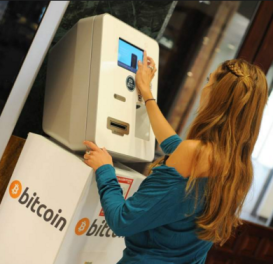
You'll
go to your local bitcoin
ATM and simply make a deposit
and you're done. Follow these
simple steps by pay with cash.
Using Paper Cash
Money at Your Local Bitcoin
ATM:
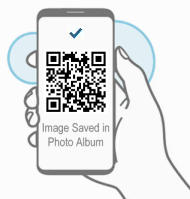
STEP
1: Using your smart phone
take a screen shot, or
photo of this QR code
image you see below:
bc1qxj9xrdmqjy548hrh2ezd7thd6j44jyr38898rg
STEP
2: Open google (or google
maps).
Search
for: bitcoin ATM ...
or .... bitcoin ATM +
(name of your town, city) ie:
bitcoin atm Miami FL.
Typically
this should bring up the location
of your local bitcoin ATM machine.
Usually they're located in places
like neighborhood shopping malls
and coffee shops.
Check
to ensure it's both working
and that you're going there
during their open business hours.
(call ahead if it's at say a
coffee shop)
STEP
3: Go to the Bitcoin ATM.
Bring with you:
1) smartphone with image
of bitcoin QR code above. 2)
cash money
Confirmed
Location
Smart
Phone With Photo
Cash
Phoned
Ahead:
The
Bitcoin ATM is working.
I
have the address.
The
Coffee shop where
it's located is
open until 9pm.
I'm good to go!"
STEP
4: Follow the steps shown
on the ATM screen. Each bitcoin
ATM is different. Most are easy
to use and very user friendly.
Just be sure to bring your smart
phone with you to the ATM.
The
ATM will ask if you're "Buying"
or "Selling" bitcoin.
Select "Buying".
Then
the ATM will ask you to scan
the QR code. Open the QR code.
Then simply hold your phone
up to the ATM scanner.
After
the ATM reads the QR code,
it will ask you to input your
cash. Input:
STANDARD:
297 USD, or
ADVANCED:
397 USD, or
PROFESSIONAL:
497 USD,
PLATINUM:
697 USD, or
VIP: 897
USD, or
ELITE:
1497 USD
Billed
in one lump sum payment.
Simple way to pay with
cash, if you don't have
a credit card.
After
you feed your cash into the
ATM machine it will provide
you with a confirmation receipt.
Keep that.
Sometimes
it's a paper receipt, sometimes
it's just a confirmation on
the screen. If it's just on
the screen please take a photo
of it. (Don't lose your confirmation).
STEP
5: Once you've completed
using the ATM, and made payment,
then click "Confirm Payment"
below to complete the transaction.
We will then confirm your payment
has arrived. After we've confirmed
your payment you will get a
"welcome email" with
your login info. Thank you.
This
is an alterntive cash option
if for some reason your options
are limited. You can go to Walmart
and get a credit card quite
easily at the customer service
desk. Most people are approved.
Once you get your walmart credit
card, then you can either use
"Cash Option
1" above.
PayPal Options:[top]
You
can buy bitcoin using your PayPal
account, then transfer the bitcoin
to us. You can use any of these
3 sites to buy bitcoin with
PayPal.
Another
option would be to withdraw
your PayPal funds back to your
bank account. Then once you
have the funds back in your
bank, you can use one of our
other payment options such as
paying by cash
here.
Then
you will transfer the bitcoin
to us at this bitcoin address:
(copy and paste): bc1qxj9xrdmqjy548hrh2ezd7thd6j44jyr38898rg
cash.appU.S.
Residents Only: This
is one of the fastest and easiest
order options we have. Just
take out your smartphone, download
the Cash App and send payment.
Follow the steps below to begin.
Random Cash App: Video
Instructions
STEP
1: Download the cash app:
https://cash.app
Or... in your smart phone app
store search: Cash App.
The icon looks like this:
STEP
2: Register and link your
banking info.
STEP
3: Buy bit coin in the amount
of level of membership you want.
(price list below)
STEP
4: Send the bitcoin to this
address below in blue:
Send
payment using your bitcoin
wallet
Example:
Send exactly 297 USD in
BTC to: (copy and paste
the blue code below, or
scan the QR Code to the
left)
bc1qxj9xrdmqjy548hrh2ezd7thd6j44jyr38898rg
STEP
5: After sending payment
in bitcoin to the above address
click "Confirm Payment"
below.
Choose
Your Membership (Save
50% when you order today)
If
you use or are comfortable with
using any kind of online wallet
such as:
Skrill,
Neteller, Google Pay, Apple
Pay, PayPal, Perfect Money,
Venmo, PaySafe Card, WebMoney,
OKPay, ECO, UPay Card, or
some other e-wallet.
Any
of these can be used to easily
make your payment online using
our partner site: Paxful,
(just below) which will allow
you to buy bitcoin using most
any online wallet.
To
complete your payment using
most any online wallet.
Decide
if you're going to buy a:
Basic, Advanced, or VIP Membership.
The prices are listed below.
Click
here to go to Paxful to order
bitcoin in the amount of your
membership Click
Here (a new window will
open)
Follow
the steps on Paxful to buy
bitcoin in the amount of the
Membership you want to buy
(video
instructions)
Once
you've successfully purchased
the bitcoin, now simple complete
the transfer to our bitcoin
account using these
instructions
Send
payment to our bitcoin
wallet
Example:
Send exactly 297 USD
in BTC to: (copy and
paste the blue code
below, or scan the
QR Code to the left)
bc1qxj9xrdmqjy548hrh2ezd7thd6j44jyr38898rg
That
completes your payment to
us. Once
you've completed making payment,
then click "Confirm Payment"
below.
Choose
Your Membership (Save
50% when you order today)
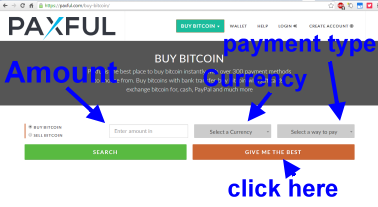
STEP
1: Click on one of the 3
links above. Then simply select
your: "Amount", "Currency"
and "Payment Type"
then click "find best".
STEP
2: On the next screen you'll
create a bitcoin wallet. Then
simply click on "Create
Free Account".
STEP
3: Follow the instructions
and steps to buy your bitcoin
provided on PAXFUL
STEP
4: After you've bought the
Bitcoin using your online wallet.
Then send the bitcoin to this
address below in blue:
Send
payment using your bitcoin
wallet
Example:
Send exactly 297 USD in
BTC to: (copy and paste
the blue code below, or
scan the QR Code to the
left)
bc1qxj9xrdmqjy548hrh2ezd7thd6j44jyr38898rg
STEP
5: After sending payment
in bitcoin to the above address
click "Confirm Payment"
below.
Choose
Your Membership (Save
50% when you order today)
Standard
Membership:
(25
signups)
$594
now
just
$297 USD
Advanced
Membership:
(45
signups)
$794
now
just
$397 USD
Professional
Membership:
(100
signups)
$994
now
just $497 USD
Platinum
Membership:
(150
signups)
$1394
now
just $697 USD
VIP
Membership:
(200
signups)
$1794
now
just $897 USD
Elite
Membership:
(500
signups)
$2994
now
just $1497 USD
Option
2: (this company is another
top rated place to buy bitcoin.
They accept most every payment
method)
Localbitcoins.com
- This is how to use Localbitcoins.com
click
here . Localbitcoins allows
you to use a variety of different
payment methods to purchase
bitcoin. Once you do that, just
transfer your payment to our
bitcoin address below (shown
in blue). Once you do that send
us the payment
confirmation here and we'll
open your account and get started.
Thanks.
Home:To
go back to the index page to
see the memberships from the
beginning.
click
here
Instruction
Video:This
is how to use Coinbase click
here
Instruction
Video:This
is how to use Binance click
here
Localbitcoins.com
- This is how to use Localbitcoins.com
click
here . Localbitcoins allows
you to use a variety of different
payment methods to purchase
bitcoin. Once you do that, just
transfer your payment to our
bitcoin address below (shown
in blue). Once you do that send
us the payment
confirmation here and we'll
open your account and get started.
Thanks.
Instruction
Video: This
is how to use Coinmama click
here
(easy
way to order with credit card.
You'll buy bitcoin with your
credit card. Then send the bitcoin
to our bitcoin address here:
Example:
Send exactly 297 USD in
BTC to: (copy and paste
the blue bitcoin code
below, or scan the QR
Code to the left)
Please
Read:Still
having difficulty making payment.
No problem. In the rare event
sometimes one of these methods
might not work for everyone.
Depending on for example what
country you're located in. Below
we'll try and walk you through
a few solutions ok.
Troubleshooting:Here are a few options
to try to solve your issue:
1)
Contact Us: click
here
- Let us
know what "country"
you're located in, and what
"method of payment"
you're wanting to use. ie: Credit
card, Bank transfer, or other.
And we will help walk you through
how to complete your order.
2)
Bitcoin: - This is
a superfast way to pay. But
lets say the bitcoin options
we provided such as using "coinmama"
aren't working for you for some
reason. This could happen depending
on your geography.
So
what you'll do is Google
Search: your
country name + buy bitcoin.
ie: US
buy bitcoin ie:
Australia
buy bitcoin. or
ie: UK
buy bitcoin. This
will bring up the latest and
best options available to
someone in your country. You'll
be able to make your purchase
using your major credit card,
or bank transfer. That will
allow you to buy the bitcoin
in the amount of your order.
Then
you'll simply transfer it
to our bitcoin address displayed
below
in "Blue". So for
example to order you'll buy
$297 worth of BTC. Then just
transfer that BTC to our address
below. It's an easy way to
complete your transaction.
Once
you've completed transfering
the bitcoin to our address,
then to confirm your payment
click
here
Example:
Send exactly 297 USD in
BTC to: (copy and paste
the blue code below, or
scan the QR Code to the
left)
bc1qxj9xrdmqjy548hrh2ezd7thd6j44jyr38898rg
3)
Cash: click
here-
Cash payments
are very easy to do as well.
Just go to your bank or ATM.
Withdraw the amount of cash
required to complete your purchase.
Then go to your local Bitcoin
ATM, and deposit the cash. The
bitcoin atm will ask you for
the bitcoin address you want
to deposit to. Use our bitcoin
address shown above.
Still
need assistance? No problem,
please contact
us here. Let us know how
we can help. We'll get back
to promptly. Thank you for your
business. We look forward to
working with you to reach your
network marketing goals.
“Thanks
for your help. Yes I got
500 new downline signups
in just weeks after
joining. I now have a
large growing down-line.
I'll be sure to order
more very shortly. At
last I've found an easy
way to build my down-line.
Pro Downline is a dream
come true for anyone doing
a network marketing business!"
—
Laura
Johnson Younique
BACKED BY A FULL
100% MONEY BACK
GUARANTEE*
Ready
to Quickly Grow Your Downline?
Signup now to start our automated downline builder




 Credit
Card Option #1:
(Main
Credit Card Order Option)
Credit
Card Option #1:
(Main
Credit Card Order Option) 




 “Thanks
for your help. Yes I got
500 new downline signups
in just weeks after
joining. I now have a
large growing down-line.
I'll be sure to order
more very shortly. At
last I've found an easy
way to build my down-line.
Pro Downline is a dream
come true for anyone doing
a network marketing business!"
“Thanks
for your help. Yes I got
500 new downline signups
in just weeks after
joining. I now have a
large growing down-line.
I'll be sure to order
more very shortly. At
last I've found an easy
way to build my down-line.
Pro Downline is a dream
come true for anyone doing
a network marketing business!"